# SSO
> ### An *SSO*, aka *Single Sign-On*, is an authentication method that allows a user to *log in once with a single set of credentials* and access multiple applications or services.
> ### This *eliminates the need to remember multiple usernames and passwords for different accounts*, increasing convenience and security by reducing the risk of password fatigue and weak or reused credentials.
### *How* It Works
* **User login**: A user logs into the first application (the identity provider) with their single set of credentials.
* **Authentication**: The identity provider authenticates the user and generates a secure digital "token" that proves their identity.
* **Access**: When the user tries to access another connected application (a service provider like us AI Voice+ app), the browser sends the token to that service.
* **Verification**: The service provider (that's us in outr case) verifies the token with the identity provider and grants the user access without requiring them to log in again.
### Key *Benefits*
* **For users**: Simplifies access to multiple applications, saving time and frustration from remembering numerous passwords.
* **For organizations**: Reduces the risk of security breaches from weak or forgotten passwords, improves productivity, and allows for centralized management of user access.
### Common *Examples*
* **Enterprise use**: Employees logging into a single portal to access various corporate applications like email, CRM, and HR systems & e.g. AI Voice+ provides the key endpoint into our app for you as the end-user.
* **Consumer use**: Using a Google or Apple account to sign into multiple third-party apps and websites if your IdP (aka your organization/company) has setup OAuth2 for Google, Apple, Microsoft, etc.
### *Easy*. In-App. *Setup*.
### ...*more* info
* **Hybrid SSO (SAML/OIDC)** — Organizations can connect their own Identity Providers (Okta, Authentik, Azure AD, etc.) via OIDC. SSO is triggered automatically by domain detection on the login page.
* **SSO Domain Detection** — As users type their email, the login form checks the domain against `Organization SSO Providers`; a branded "Sign in with \[Provider]" banner appears on match.
* **SSO Edge Functions** — `SSO Authorize` generates the OIDC authorization URL with HMAC-SHA256 signed state (CSRF protection, 10-minute TTL); `SSO Callback` verifies the signed state, handles code exchange, auto-provisions new users, links them to organizations, and signs them in via magic links.
* **SSO Security Hardening** — Redirect URI validation against allowed origins whitelist; domain format regex validation; scalable user lookup via profiles (not `listUsers()`); defense-in-depth org re-derivation from email domain; existing user org linkage on SSO login; `UNIQUE` partial index on `SSO Domain` prevents domain collisions.
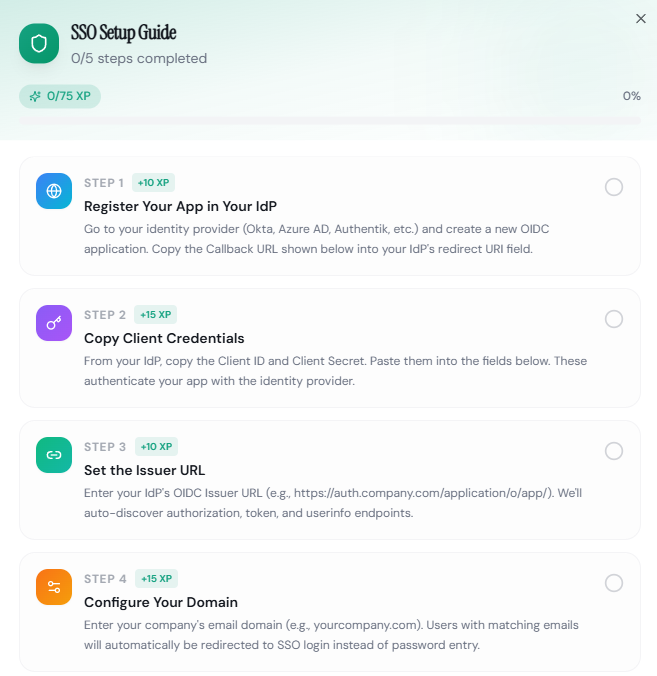
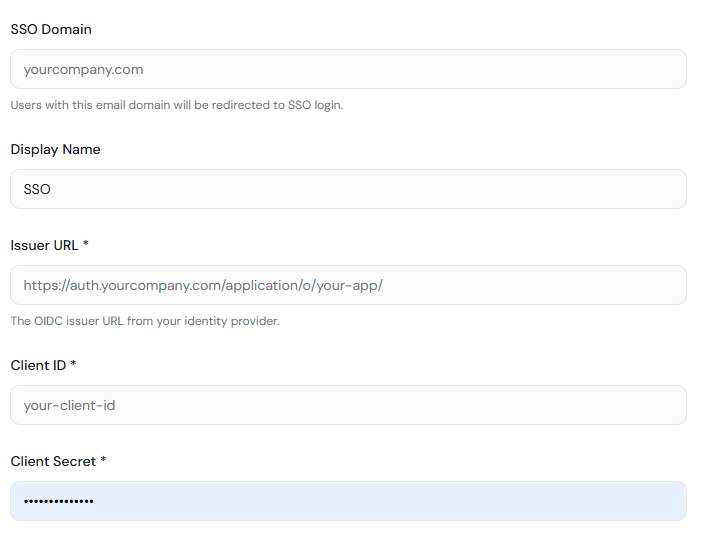
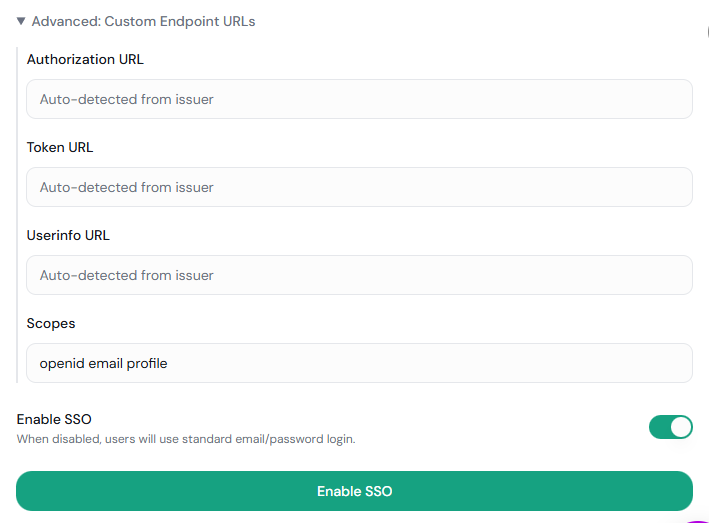
* **SSO Admin Settings** — Organization admins configure OIDC settings (Issuer URL, Client ID, Client Secret, scopes, SSO domain) from Settings → SSO with a dedicated management UI.
* **Gamified SSO Setup Guide** — Interactive 5-step "How to Use" roadmap with XP tracking, progress bar, completion badges, confetti celebration, and localStorage persistence to guide admins through IdP configuration.
{% content-ref url="../active-development/325+-features-shipped" %}
[325+-features-shipped](https://docs.lisaiceland.com/platform+/active-development/325+-features-shipped)
{% endcontent-ref %}
{% content-ref url="../active-development/50+-competitive-advantages" %}
[50+-competitive-advantages](https://docs.lisaiceland.com/platform+/active-development/50+-competitive-advantages)
{% endcontent-ref %}